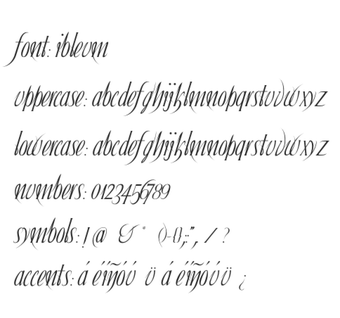
Ibleum, by Ibleum, is a stylized display font designed for creative and digital projects on Windows desktops. The typeface supplies a modern character set and supports numbers plus basic punctuation, delivered as TrueType or OpenType files for use across desktop applications and print. It emphasizes clean geometric lines optimized for high-resolution displays and print, and installation is simple via the Windows Fonts folder so it appears in any application that reads system fonts.
What does Ibleum change about the desktop?
As a stylized display typeface, Ibleum installs as a system font so desktop applications find it in their font menus. It is distributed through major repositories such as DaFont and supplied as TrueType or OpenType files. Designers can replace default headline or branding faces in mockups and desktop themes, making the desktop or project files use a single, modern display option for short-form typography.
How much typographic control does Ibleum give?
Ibleum provides a standard character set with uppercase, lowercase, numbers, and basic punctuation, which supports headings, logos, and short labels. The glyphs use clean geometric strokes that retain clarity at larger display sizes. The font does not document variable axes or alternate stylistic sets, so typographic variation requires scaling, tracking, or using companion fonts rather than relying on embedded weight or style variants.
Is Ibleum lightweight and compatible with desktop workflows?
The font advertises a small file size and is optimized for high-resolution displays and print, so it does not run background processes or add runtime CPU load. It works on Windows and any desktop that supports TTF/OTF fonts, appearing in word processors and image editors after installation. This single-file, system-font model keeps integration straightforward for daily design and desktop customization tasks.
A practical display face for focused creative use
Ibleum is a practical option for designers and desktop customizers who want a distinctive display typeface for short-form graphics and branding. Before publishing, verify commercial-use rights by reviewing the bundled license, since repository listings differ. Also perform production testing for language coverage, because extended character support may be narrower than full text families, making it better suited to headlines and visual identity work.
Pros
Available as TrueType and OpenType for system-wide use
Optimized for high-resolution displays and print
Small file size with no background runtime impact
Cons
Character set limited to standard alphanumeric and basic symbols
No documented variable weights or stylistic alternates
Commercial licensing terms require review in the bundled license
Laws concerning the use of this software vary from country to country. We do not encourage or condone the use of this program if it is in violation of these laws. Softonic may receive a referral fee if you click or buy any of the products featured here.